
This error occurs when applying the Microsoft W10 1709 security baseline to a W10 1709 device. The error will show when running GPUpdate on the command line as shown below, and in a GPResults report.
Cause
Since the W10 1703, Microsoft has removed the Untrusted Font Blocking setting from it’s security baseline.
As expected, the W10 1709 security baseline also does not have this setting, and support for the GPExtension that applies this setting has been removed from the OS altogether. However the GPO backup provided for the W10 1709 Computer Security baseline still includes this extension, even though the setting is not enabled, which is what causes the error you see above.
Fix
You can fix the problem by removing the MitigationOptions GPExtension GUID from the Microsoft backup and then re-importing the GPO into your environment.
To find the right extension GUID we run a GPResult /H gpresult.html on an affected client. Open the gpresult.htm and drill down into the MitigationOptions error until you find the details shown below, which displays the ExtensionId. You’ll need that GUID in a second.
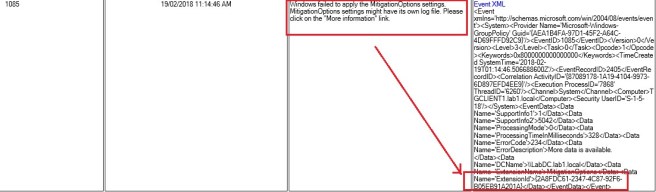
Open the Backup.xml file located in the Microsoft baseline folder GPOs\{50FB9D1D-4213-434F-9FD3-DC82D8201178}, this is the backup of the Computer security baseline. Locate the GUID you find in the ExtensionId field {2A8FDC61-2347-4C87-92F6-B05EB91A201A} and delete it from the MachineExtensionGuids tag.
Before
<MachineExtensionGuids>
 <![CDATA[[{2A8FDC61-2347-4C87-92F6-B05EB91A201A}{D02B1F72-3407-48AE-BA88-E8213C6761F1}][{35378EAC-683F-11D2-A89A-00C04FBBCFA2}{0F6B957D-509E-11D1-A7CC-0000F87571E3}{B05566AC-FE9C-4368-BE01-7A4CBB6CBA11}{D02B1F72-3407-48AE-BA88-E8213C6761F1}][{827D319E-6EAC-11D2-A4EA-00C04F79F83A}{803E14A0-B4FB-11D0-A0D0-00A0C90F574B}][{D76B9641-3288-4F75-942D-087DE603E3EA}{D02B1F72-3407-48AE-BA88-E8213C6761F1}][{F312195E-3D9D-447A-A3F5-08DFFA24735E}{D02B1F72-3407-48AE-BA88-E8213C6761F1}][{F3CCC681-B74C-4060-9F26-CD84525DCA2A}{0F3F3735-573D-9804-99E4-AB2A69BA5FD4}{803E14A0-B4FB-11D0-A0D0-00A0C90F574B}]]]>
 </MachineExtensionGuids>
After
<MachineExtensionGuids>
 <![CDATA[[{D02B1F72-3407-48AE-BA88-E8213C6761F1}][{35378EAC-683F-11D2-A89A-00C04FBBCFA2}{0F6B957D-509E-11D1-A7CC-0000F87571E3}{B05566AC-FE9C-4368-BE01-7A4CBB6CBA11}{D02B1F72-3407-48AE-BA88-E8213C6761F1}][{827D319E-6EAC-11D2-A4EA-00C04F79F83A}{803E14A0-B4FB-11D0-A0D0-00A0C90F574B}][{D76B9641-3288-4F75-942D-087DE603E3EA}{D02B1F72-3407-48AE-BA88-E8213C6761F1}][{F312195E-3D9D-447A-A3F5-08DFFA24735E}{D02B1F72-3407-48AE-BA88-E8213C6761F1}][{F3CCC681-B74C-4060-9F26-CD84525DCA2A}{0F3F3735-573D-9804-99E4-AB2A69BA5FD4}{803E14A0-B4FB-11D0-A0D0-00A0C90F574B}]]]>
 </MachineExtensionGuids>
Save the Backup.xml, re-Import the baseline and voila, no more error.
Also, in case you were wondering, the other Mitigation Option setting Process Mitigation Options, uses a different GPExtension GUID and name.
Colin
 Colin Ford Blog