
There have been improvements over the years within SCCM to help prevent OSD admins from deploying career changing task sequences to entire environments and wiping out thousands systems. Namely, the ability to limit within the console which collections you are able to deploy an OSD task sequence to, based on the number of members of that collection. The introduction of this feature likely shows that this event was occurring probably way too often.
However, even with this in place, I still feel a lot more comfortable setting up a fail safe within the task sequence itself in case an environment is not configured properly or it is too hard to change while on a consulting gig, or whatever the case.
There are a few ways to do this, and I normally layer them, but this is the one “Uber” method which basically stops the task sequence running from within Windows if it was not initiated manually by a user via Software Center. In other words a Required TS deployment that runs without user interaction while Windows is running. It is actually relatively simple:
- Create a Group at the top of your task sequence that all other steps and groups will fall under
- Set the conditions on this group as follows
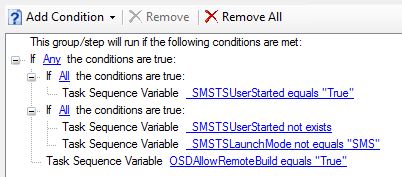
Thats it! Easy. So let me explain what is going on….
The variables that begin with _SMSTS are all built-in variables that SCCM sets up for you when the task sequence is started, we can leverage two of them to tell how the task sequence was started on the device. This is how the logic works:
- If _SMSTSUserStarted = True we let the task sequence run because a user initiated it manually
- If _SMSTSUserStarted does not exist (user did not start it), AND the _SMSTSLaunchMode is anything but “SMS” (which would mean the SCCM agent started it via a Required deployment) allow it to run. This could be “PXE” for example, where the _SMSTSUserStarted variable also would not exist but you would likely want the task sequence to run in this condition.
So we are looking for that dangerous condition and not running if it exists. You may have also noticed we have a custom variable to override this fail safe called OSDAllowRemoteBuild. If you REALLY wanted to build a bunch of machines via a forced advert you would set this as True on that collection only and it would allow machines in that collection to override the fail safe. This is purely optional and could be removed entirely to be sure that human error interference is removed from outside of the task sequence.
There you go… Now to enjoy a good nights sleep knowing that at least that your task sequence is a safe one.
 Colin Ford Blog
Reblogged this on System Center.
LikeLike